
Table of Contents
Syntax of Calling Subroutine
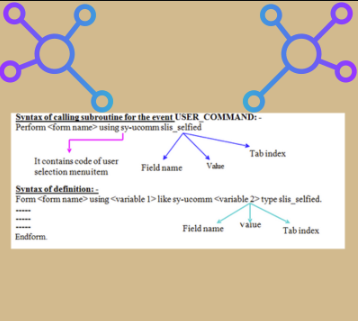
Object :Based on the given purchase doc numbers, to display the purchase document numbers, document dates & vendor numbers by using SAP ALV . If the user clicks on any purchasing document number only then we display the all the purchasing document item details by using ALV,if the user clicks on any vendor number only then we display the vendor details(LIFNR NAME1 ORT01).
REPORT ZBB_S_ALV09.
DATA V1 TYPE LFA1-LIFNR.
TYPE-POOLS SLIS.
TABLES EKKO.
SELECT-OPTIONS S_EBELN FOR EKKO-EBELN.
*Declare the data internal table
TYPES : BEGIN OF TY_EKKO,
EBELN TYPE EKKO-EBELN,
BEDAT TYPE EKKO-BEDAT,
LIFNR TYPE EKKO-LIFNR,
END OF TY_EKKO.
DATA IT_EKKO TYPE TABLE OF TY_EKKO.
DATA IT_EKPO LIKE TABLE OF EKPO.
TYPES : BEGIN OF TY_LFA1,
LIFNR TYPE LFA1-LIFNR,
NAME1 TYPE LFA1-NAME1,
ORT01 TYPE LFA1-ORT01,
END OF TY_LFA1.
DATA IT_LFA1 TYPE TABLE OF TY_LFA1.
*Filling the data internal table
SELECT EBELN BEDAT LIFNR FROM EKKO INTO TABLE IT_EKKO
WHERE EBELN IN S_EBELN.
*Declare the fieldcatalog
DATA : IT_FCAT TYPE SLIS_T_FIELDCAT_ALV,
WA_FCAT LIKE LINE OF IT_FCAT.
DATA : IT_FCAT1 TYPE SLIS_T_FIELDCAT_ALV,
WA_FCAT1 LIKE LINE OF IT_FCAT1.
*Filling the fieldcatalog
WA_FCAT-FIELDNAME = ‘EBELN’.
WA_FCAT-COL_POS = ‘1’.
WA_FCAT-SELTEXT_M = ‘Pur.doc’.
APPEND WA_FCAT TO IT_FCAT.
CLEAR WA_FCAT.
WA_FCAT-FIELDNAME = ‘BEDAT’.
WA_FCAT-COL_POS = ‘2’.
*WA_FCAT-SELTEXT_M = ‘Doc.date’.
WA_FCAT-REF_FIELDNAME = ‘BEDAT’.
WA_FCAT-REF_TABNAME = ‘EKKO’.
APPEND WA_FCAT TO IT_FCAT.
CLEAR WA_FCAT.
WA_FCAT-FIELDNAME = ‘LIFNR’.
WA_FCAT-COL_POS = ‘3’.
WA_FCAT-SELTEXT_M = ‘Vendor’.
APPEND WA_FCAT TO IT_FCAT.
CLEAR WA_FCAT.
*Declare the event internal table
DATA : IT_EVENT TYPE SLIS_T_EVENT,
WA_EVENT LIKE LINE OF IT_EVENT.
*Filling the event internal table
WA_EVENT-NAME = ‘USER_COMMAND’.
WA_EVENT-FORM = ‘UC’.
*PERFORM UC USING SY-UCOMM SLIS_SELFIELD
APPEND WA_EVENT TO IT_EVENT.
*Display output
CALL FUNCTION ‘REUSE_ALV_LIST_DISPLAY’
EXPORTING
I_CALLBACK_PROGRAM = ‘ZSP_7PM_O_ALV6’
IT_FIELDCAT = IT_FCAT
IT_EVENTS = IT_EVENT
TABLES
t_outtab = IT_EKKO.
FORM UC USING A LIKE SY-UCOMM B TYPE SLIS_SELFIELD.
IF B-FIELDNAME = ‘EBELN’.
SELECT * FROM EKPO INTO TABLE IT_EKPO WHERE EBELN = B-VALUE.
CALL FUNCTION ‘REUSE_ALV_LIST_DISPLAY’
EXPORTING
I_STRUCTURE_NAME = ‘EKPO’
TABLES
t_outtab = IT_EKPO.
ELSEIF B-FIELDNAME = ‘LIFNR’.
V1 = B-VALUE.
CALL FUNCTION ‘CONVERSION_EXIT_ALPHA_INPUT’
EXPORTING
input = V1
IMPORTING
OUTPUT = V1 .
SELECT LIFNR NAME1 ORT01 FROM LFA1 INTO TABLE IT_LFA1 WHERE LIFNR = V1.
*Filling the fieldcatalog
WA_FCAT1-FIELDNAME = ‘LIFNR’.
WA_FCAT1-COL_POS = ‘1’.
WA_FCAT1-SELTEXT_M = ‘Vendor’.
APPEND WA_FCAT1 TO IT_FCAT1.
CLEAR WA_FCAT1.
WA_FCAT1-FIELDNAME = ‘NAME1’.
WA_FCAT1-COL_POS = ‘2’.
WA_FCAT1-SELTEXT_M = ‘Ven.name’.
APPEND WA_FCAT1 TO IT_FCAT1.
CLEAR WA_FCAT1.
WA_FCAT1-FIELDNAME = ‘ORT01’.
WA_FCAT1-COL_POS = ‘3’.
WA_FCAT1-SELTEXT_M = ‘City’.
APPEND WA_FCAT1 TO IT_FCAT1.
CLEAR WA_FCAT1.
*Display output
CALL FUNCTION ‘REUSE_ALV_LIST_DISPLAY’
EXPORTING
IT_FIELDCAT = IT_FCAT1
TABLES
t_outtab = IT_LFA1.
Refresh IT_FCAT1.
ENDIF.
ENDFORM.
Note: – If you click on most of the records, if the output isn’t coming then we open the table in SE11 & pass the values. If the data is available then you must check the any conversion routine is available or not.
Steps to identify the conversion routine: –
-> Go to se11 ->Open the table ->Double click on data element of the field. -> Double click on domain -> Double click on conversion routine, -> Identify the input routine(Function module) & apply the input routine before select query.
Some of the standard transaction codes:
1.XK03——>Display vendor
2.XD03——>Display customer
3.MM03—–>Display material details
4.ME23N—->Display purchase order
5.VA03——>Display sales order
6.FB03——>Display accounting document
Note : 1—>create,2—>change,3—>display
Syntax of call the transaction code:
CALL TRANSACTION ‘<TCODE>’.
Ex:
Call tranaction ‘XK03’.
Note : Before calling the transaction we must set the value.
Syntax of set the value:
SET PARAMETER ID ‘<ID NAME>’ FIELD ‘<VALUE>’.
Steps to identify the parameter id:
-> Execute the transaction code (ex : XK03)
-> Place the cursor on input field
-> click on F1
-> Click on technical information
-> Identify the parameter id ( LIF)
Ex :
PARAMETER P_LIFNR TYPE LFA1-LIFNR.
SET PARAMETER ID ‘LIF’ FIELD P_LIFNR.
CALL TRANSACTION ‘XK03’.
Object : Based on the given pur.doc numbers to display the pur.doc numbers,document dates and vendor numbers by using alv. If the user click on any pur.doc number only to display pur.doc details through ME23N transaction, if the user click on any vendor to display vendor details through XK03 transaction.
REPORT ZBBST_K_ALV9.
TYPE-POOLS SLIS.
TABLES EKKO.
SELECT-OPTIONS S_EBELN FOR EKKO-EBELN.
*Declare the data internal table
TYPES : BEGIN OF TY_EKKO,
EBELN TYPE EKKO-EBELN,
BEDAT TYPE EKKO-BEDAT,
LIFNR TYPE EKKO-LIFNR,
END OF TY_EKKO.
DATA IT_EKKO TYPE TABLE OF TY_EKKO.
*Declare the fieldcatalog
DATA : IT_FCAT TYPE SLIS_T_FIELDCAT_ALV,
WA_FCAT LIKE LINE OF IT_FCAT.
*Declare the event internal table
DATA : IT_EVENT TYPE SLIS_T_EVENT,
WA_EVENT LIKE LINE OF IT_EVENT.
DATA V1 TYPE EKKO-EBELN.
AT SELECTION-SCREEN.
SELECT SINGLE EBELN FROM EKKO INTO V1 WHERE EBELN IN S_EBELN.
IF SY-SUBRC <> 0.
MESSAGE E000(ZSP_7PM_MSG1) WITH ‘INVALID PUR.DOC’.
ENDIF.
START-OF-SELECTION.
*Filling the data internal table
SELECT EBELN BEDAT LIFNR FROM EKKO INTO TABLE IT_EKKO
WHERE EBELN IN S_EBELN.
*Filling the fieldcatalog
WA_FCAT-FIELDNAME = ‘EBELN’.
WA_FCAT-COL_POS = ‘1’.
WA_FCAT-SELTEXT_M = ‘Pur.doc’.
APPEND WA_FCAT TO IT_FCAT.
CLEAR WA_FCAT.
WA_FCAT-FIELDNAME = ‘BEDAT’.
WA_FCAT-COL_POS = ‘2’.
*WA_FCAT-SELTEXT_M = ‘Doc.date’.
WA_FCAT-REF_FIELDNAME = ‘BEDAT’.
WA_FCAT-REF_TABNAME = ‘EKKO’.
APPEND WA_FCAT TO IT_FCAT.
CLEAR WA_FCAT.
WA_FCAT-FIELDNAME = ‘LIFNR’.
WA_FCAT-COL_POS = ‘3’.
WA_FCAT-SELTEXT_M = ‘Vendor’.
APPEND WA_FCAT TO IT_FCAT.
CLEAR WA_FCAT.
*Filling the event internal table
WA_EVENT-NAME = ‘USER_COMMAND’.
WA_EVENT-FORM = ‘UC’.
*PERFORM UC USING SY-UCOMM SLIS_SELFIELD
APPEND WA_EVENT TO IT_EVENT.
*Display the output
CALL FUNCTION ‘REUSE_ALV_LIST_DISPLAY’
EXPORTING
I_CALLBACK_PROGRAM = ‘ZBBST_K_ALV9’
IT_FIELDCAT = IT_FCAT
IT_EVENTS = IT_EVENT
TABLES
T_OUTTAB = IT_EKKO.
FORM UC USING A LIKE SY-UCOMM B TYPE SLIS_SELFIELD.
IF B-FIELDNAME = ‘EBELN’.
SET PARAMETER ID ‘BES’ FIELD B-VALUE.
CALL TRANSACTION ‘ME23N’.
ELSEIF B-FIELDNAME = ‘LIFNR’.
SET PARAMETER ID ‘LIF’ FIELD B-VALUE.
CALL TRANSACTION ‘XK03’ AND SKIP FIRST SCREEN.
ENDIF.
ENDFORM.
Differences between Grid and List display
Grid Display
• Grid Display Support OOP’s ALV.
• Grid Display Slower
• Edit and logo is possible in Grid Display.
• Blocked ALV is not possible in grid Display.
• In the output [i] symbol indicates F1 help.
• This is used to display the output in grid format.
List Display
- List Display doesn’t supports OOP’s ALV.
- List display faster.
- There are not possible in list display.
- This is possible in list display.
- In list display [i] indicates number of records are displayed.
- This is used to display the output in list format.
Working with menu painter:
Menu painter is a tool to design the user interface to the program.
The transaction code for menu painter is ‘SE41’.

Working with GUI
Syntax of calling subroutine for the ‘PF_STATUS_SET’ event:
PERFORM
Steps to copy the existing gui from SAPLKKBL standard program:
-> Execute SE41
-> Click on Copy status buttion in the application tool bar
-> Provide from program – SAPLKKBL
-> Status – STANDARD_FULLSCREEN
-> To program – ZSPRAO_O_ALV11
-> Status – STAT
-> Click on copy and enter
-> Open our program and status in change mode
-> Add our own buttons as per client requirement
-> save, check and activate.
Syntax of attaching our own gui to the program:
SET PF-STATUS ‘<Status name>’.
Ex:
SET PF-STATUS ‘STAT’.
Note : in real time,whenever we use list/grid function module,then we must pass
1.data internal table
2.fieldcatalog
3.layout workarea
4.i_callback_program
Note : We can also use classical report events in alv other than ‘top-of-page’ and ‘end-of-page’.
Note : Whenever we use any one of the classical report event,then we use ‘start-of-selection’.
Object: Based on the given Sales document numbers,to display the sales doc numbers,Document date
and Customer number by using ALV and also attach DOWNLOAD button in the application tool bar.if
the user click on download button ,then we download the displayed data into presentation server
(C,D..drives) .
REPORT ZBBST_K_ALV6.
TYPE-POOLS SLIS.
TABLES VBAK.
SELECT-OPTIONS S_VBELN FOR VBAK-VBELN.
*Declare the data internal table
TYPES : BEGIN OF TY_VBAK,
VBELN TYPE VBAK-VBELN,
AUDAT TYPE VBAK-AUDAT,
KUNNR TYPE VBAK-KUNNR,
END OF TY_VBAK.
DATA IT_VBAK TYPE TABLE OF TY_VBAK.
*Declare the fieldcatalog internal table
DATA : IT_FCAT TYPE SLIS_T_FIELDCAT_ALV,
WA_FCAT LIKE LINE OF IT_FCAT.
*Declare the layout workarea
DATA WA_LAYOUT TYPE SLIS_LAYOUT_ALV.
*Declare the event internal table
DATA : IT_EVENT TYPE SLIS_T_EVENT,
WA_EVENT LIKE LINE OF IT_EVENT.
*Filling the data internal table
SELECT VBELN AUDAT KUNNR FROM VBAK INTO TABLE IT_VBAK WHERE VBELN IN S_VBELN.
*Filling the fieldcatalog
WA_FCAT-FIELDNAME = ‘VBELN’.
WA_FCAT-COL_POS = ‘1’.
WA_FCAT-SELTEXT_M = ‘Sales.doc.no’.
APPEND WA_FCAT TO IT_FCAT.
CLEAR WA_FCAT.
WA_FCAT-FIELDNAME = ‘AUDAT’.
WA_FCAT-COL_POS = ‘2’.
WA_FCAT-SELTEXT_M = ‘Docu.date’.
APPEND WA_FCAT TO IT_FCAT.
CLEAR WA_FCAT.
WA_FCAT-FIELDNAME = ‘KUNNR’.
WA_FCAT-COL_POS = ‘3’.
WA_FCAT-SELTEXT_M = ‘Customer no’.
APPEND WA_FCAT TO IT_FCAT.
CLEAR WA_FCAT.
*Filling the layout workarea
WA_LAYOUT-COLWIDTH_OPTIMIZE = ‘X’.
WA_LAYOUT-ZEBRA = ‘X’.
*Filling the event internal table
WA_EVENT-NAME = ‘PF_STATUS_SET’.
WA_EVENT-FORM = ‘ZGUI’.
*PERFORM ZGUI USING SLIS_T_EXTAB
APPEND WA_EVENT TO IT_EVENT.
WA_EVENT-NAME = ‘USER_COMMAND’.
WA_EVENT-FORM = ‘UC’.
*PERFORM UC USING SY-UCOMM SLIS_SELFIELD
APPEND WA_EVENT TO IT_EVENT.
*Display the output
CALL FUNCTION ‘REUSE_ALV_LIST_DISPLAY’
EXPORTING
I_CALLBACK_PROGRAM = SY-CPROG
IS_LAYOUT = WA_LAYOUT
IT_FIELDCAT = IT_FCAT
IT_EVENTS = IT_EVENT
TABLES
T_OUTTAB = IT_VBAK.
FORM ZGUI USING M TYPE SLIS_T_EXTAB.
SET PF-STATUS ‘STAT’.
ENDFORM.
FORM UC USING A LIKE SY-UCOMM B TYPE SLIS_SELFIELD.
IF A = ‘DOWN’.
CALL FUNCTION ‘DOWNLOAD’
EXPORTING
FILETYPE = ‘DAT’
TABLES
DATA_TAB = IT_VBAK.
ENDIF.
ENDFORM.
Object : Based on the given pur.doc numbers to display the pur.doc numbers,doc.dates and vendor numbers by using alv and also print the logo in TOP_OF_PAGE.
*sap alv , alv report, alv grid display in sap abap , alv in sap abap , alv interactive report in sap abap,alv oops in sap abap
Note : ‘REUSE_ALV_COMMENTARY_WRITE’ is the function module which is used to print the logo and text in top or bottom events in grid display.
The input for the above function module is
1. I_LOGO as object key name in OAER tcode
2. Internal table which contains 2 fields (Empty also ok)
(i)What to display (info)
(ii)How to display(typ)
We have only three types to display H(header),S(selection),A(action))
Note : In slis,we have one type i.e SLIS_T_LISTHEADER which contains above fields so we declare internal table by refering SLIS_T_LISTHEADER
Step to upload the logo:
-> Execute OAER transaction code
-> Provide class name as PICTURES (fixed)
-> Provide class type is OT(fixed)
-> Provide object key as any name (ex: surya) (This name only we passed into logo fm)
-> Execute
-> Expand the standard document types
-> Double click on screen
-> Browse the logo
-> Enter
REPORT ZBBSRT_k_ALV10.
TYPE-POOLS SLIS.
TABLES EKKO.
SELECT-OPTIONS S_EBELN FOR EKKO-EBELN.
*Declare the data internal table
TYPES : BEGIN OF TY_EKKO,
EBELN TYPE EKKO-EBELN,
BEDAT TYPE EKKO-BEDAT,
LIFNR TYPE EKKO-LIFNR,
END OF TY_EKKO.
DATA IT_EKKO TYPE TABLE OF TY_EKKO.
*Filling the data internal table
SELECT EBELN BEDAT LIFNR FROM EKKO INTO TABLE IT_EKKO WHERE EBELN IN S_EBELN.
*Declare the fieldcatalog
DATA : IT_FCAT TYPE SLIS_T_FIELDCAT_ALV,
WA_FCAT LIKE LINE OF IT_FCAT.
*Filling the fieldcatalog
WA_FCAT-FIELDNAME = ‘EBELN’.
WA_FCAT-COL_POS = ‘1’.
WA_FCAT-SELTEXT_M = ‘Pur.doc’.
APPEND WA_FCAT TO IT_FCAT.
CLEAR WA_FCAT.
WA_FCAT-FIELDNAME = ‘BEDAT’.
WA_FCAT-COL_POS = ‘2’.
WA_FCAT-SELTEXT_M = ‘Doc.date’.
APPEND WA_FCAT TO IT_FCAT.
CLEAR WA_FCAT.
WA_FCAT-FIELDNAME = ‘LIFNR’.
WA_FCAT-COL_POS = ‘3’.
WA_FCAT-SELTEXT_M = ‘Vendor’.
APPEND WA_FCAT TO IT_FCAT.
CLEAR WA_FCAT.
*Declare the event internal table
DATA : IT_EVENT TYPE SLIS_T_EVENT,
WA_EVENT LIKE LINE OF IT_EVENT.
*Filling the event internal table
WA_EVENT-NAME = ‘TOP_OF_PAGE’.
WA_EVENT-FORM = ‘ZTOP’. “PERFORM ZTOP
APPEND WA_EVENT TO IT_EVENT.
*Display the output
CALL FUNCTION ‘REUSE_ALV_GRID_DISPLAY’
EXPORTING
I_CALLBACK_PROGRAM = SY-CPROG
IT_FIELDCAT = IT_FCAT
IT_EVENTS = IT_EVENT
TABLES
T_OUTTAB = IT_EKKO.
FORM ZTOP.
DATA IT TYPE SLIS_T_LISTHEADER.
DATA WA LIKE LINE OF IT.
WA-INFO = ‘BBST Technologies’.
WA-TYP = ‘H’.
APPEND WA TO IT.
CALL FUNCTION ‘REUSE_ALV_COMMENTARY_WRITE’
EXPORTING
IT_LIST_COMMENTARY = IT
I_LOGO = ‘SURYA1’
ENDFORM.
ALV Report in SAP ABAP : How to Implement and Configure Part 1 please click here
For complete ABAP tutorial please click here
To learn SAP ABAP from SAP please click here
ALV Report Performance Optimization: Best Practices for Faster SAP Reports
Optimizing ALV (ABAP List Viewer) reports is essential for improving SAP system performance and delivering a smooth user experience. Slow-running reports can frustrate end-users and increase server load. By following these ALV optimization techniques, you can significantly enhance report speed and efficiency.
1. Optimize Data Retrieval for Faster ALV Reports
Use Selective Data Filtering
Apply WHERE clauses to restrict data at the database level.
**Avoid SELECT *** – explicitly specify only the required fields.
Use SELECT…UP TO n ROWS for large datasets to limit initial loading.
Improve Database Performance
Ensure proper indexing on frequently queried fields.
Use %_HINTS for database-specific optimizations (e.g., Oracle hints).
Consider JOIN optimizations or CDS views for complex queries.
2. ALV-Specific Performance Boosts
Implement Server-Side Paging
Load data in chunks using REUSE_ALV_GRID_DISPLAY with I_CALLBACK_PFM_TOP_OF_PAGE.
Use CL_SALV_TABLE for better control over memory and rendering.
Optimize ALV Grid Settings
Hide unnecessary columns (set NO_OUT for technical fields).
Disable unused ALV toolbar functions to reduce overhead.
Adjust buffer settings in ALV function modules for better memory handling.
3. Enhance ABAP Code Efficiency
Optimize Internal Table Operations
Use SORTED or HASHED tables for faster lookups.
Replace nested loops with READ TABLE…BINARY SEARCH.
Free unused memory with CLEAR and FREE statements.
Leverage Background Processing
Run heavy reports in background jobs to avoid UI delays.
Use parallel processing for large datasets where applicable.
4. Improve User Experience & UI Performance
Reduce Screen Load Time
Pre-load frequently used layouts to save initialization time.
Implement asynchronous data loading with progress indicators.
Split data into multiple tabs for better navigation.
Optimize Event Handling
Avoid complex logic in hotspot click events.
Use delayed event processing for heavy operations.
5. Monitor & Analyze Performance
Identify Bottlenecks
Use SAT (ABAP Runtime Analysis) to find slow code sections.
Check ST05 SQL traces for inefficient database queries.
Monitor memory usage with s/memory or CL_ABAP_MEMORY_MEASUREMENT.